
Table of Contents
ToggleIntroduction
Android development has changed significantly as Kotlin, Jetpack Compose, AI integration, and adaptive interfaces become increasingly important. Therefore, candidates should prepare beyond basic Java concepts and understand modern Android development workflows. These Android interview questions can help developers strengthen both foundational and practical knowledge.
Moreover, modern interviews increasingly test architecture, asynchronous programming, security, testing, and AI-assisted application development.
Why are you not able to run standard Java bytecode on Android?
Answer: Android utilizes the Dalvik Virtual Machine (DVM), which requires Dalvik bytecode. First of all, we need to change Java class files into Dalvik Executable files utilizing an Android tool called “dx”. In ordinary conditions, developers will not be utilizing this tool directly, and fabricating tools will care for the generation of DVM compatible files.
However, modern Android applications use Android Runtime rather than the original Dalvik execution model. Additionally, current build tools convert compiled application code into DEX files automatically during the build process. Therefore, interview candidates should understand DEX compilation, Android Runtime, and modern application packaging concepts.
Can Android applications only be programmed in Java?
Answer: No, it is not required. You can program Android applications that can be created utilizing the NDK in C/C++. The NDK is a toolset that enables you to execute parts of your application utilizing native-code languages, for example C and C++. Regularly, great use cases for the NDK are CPU-intensive applications for example game engines, signal processing, and physics simulation.
The distinction between an ordinary .png and a nine-patch picture?
Answer: It is a resizable bitmap asset that can be utilized for backgrounds or other images on the gadget. NinePatch class allows drawing a bitmap in nine segments. The nine patch images have an extension of .9.png. It permits extension in 9 different ways, i.e., 4 corners that are unscaled, 4 edges that are scaled in 1 axis, and the centre one that can be scaled in both axes.
However, modern Android interfaces increasingly use vector assets, Jetpack Compose components, and responsive layouts. As a result, developers can create interfaces that adapt smoothly across phones, tablets, foldables, and wearable devices.
What are the distinctive storage methods in Android?
Answer: Android offers several distinct alternatives for data persistence. Shared Preferences – Store private primitive information in key-value sets. This occasionally gets constrained as it offers only key-value sets. You cannot save your individual Java types. Internal Storage – Store private information on the device memory.
Additionally, developers now commonly use DataStore for structured preference storage and Room for local relational data. Meanwhile, scoped storage provides stronger control over application access to files stored on devices. Therefore, interviews may also include questions about privacy, encrypted storage, caching, and offline-first application architecture.
Modern Android Skills Interviewers Now Expect
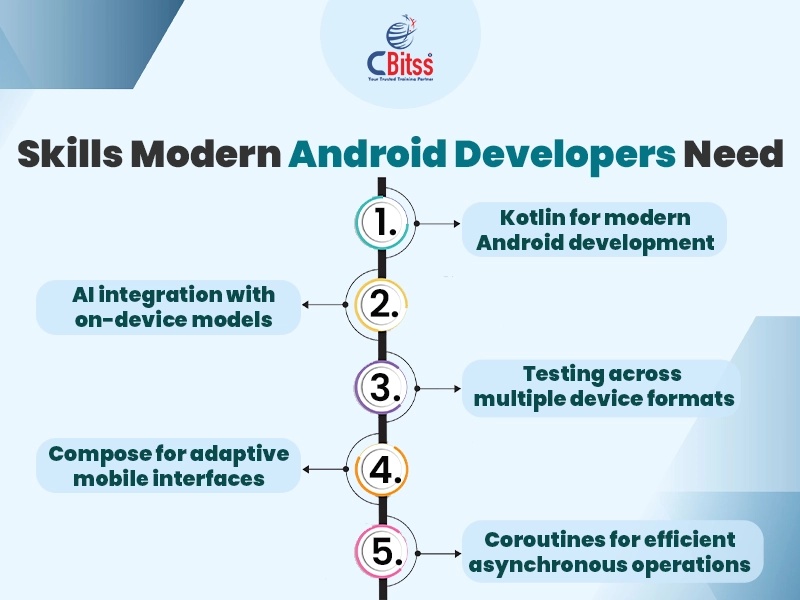
Modern Android development increasingly focuses on declarative interfaces, scalable architecture, asynchronous operations, and intelligent application experiences.
For example, Jetpack Compose has become central to modern UI development because it simplifies declarative interface creation.
Additionally, Kotlin coroutines help developers manage asynchronous tasks without blocking the main application thread.
Meanwhile, adaptive layouts are becoming essential because Android applications now run across many screen sizes and device categories.
Furthermore, developers should understand Material Design principles, dependency injection, lifecycle management, and application state handling.
Candidates exploring broader programming careers can also compare how Python and Java programming continue serving different development ecosystems.
Stay ahead of the curve by learning AI-powered design techniques for the web.
What is an ANR warning in Android?
Answer: ANR is short for Application Not Responding. Android frameworks show this dialog if the application is performing excessive tasks on the main thread and has been unresponsive for quite a while.
Can you convey executable JARs on Android? Which packaging is supported by Android?
Answer: No, the Android stage does not support JAR arrangements. Applications are packed into an Android Package (.apk) utilizing the Android Asset Packaging Tool (AAPT) and afterwards conveyed onto the Android stage. Google provides Android Development Tools for Eclipse that can be utilized to produce an Android Package.
However, Android Studio has replaced Eclipse-based Android Development Tools as the standard development environment. Additionally, Android App Bundles are widely used for publishing optimized applications through Google Play. The platform can then generate optimized APK files according to device configuration requirements.
How can ANR be prevented?
Answer: One procedure that keeps the Android framework from finishing up code that has been unresponsive for a significant lot of time is to make a child thread. Inside the child thread, most of the actual tasks of the code can be placed, so that the main thread runs with minimal periods of unresponsiveness.
Moreover, developers now commonly use Kotlin coroutines instead of manually managing threads for many asynchronous operations. WorkManager also handles reliable background tasks that should continue even when application conditions change. Consequently, interviewers may test knowledge of coroutines, dispatchers, WorkManager, and structured concurrency.
Today, developers reduce ANR risks through coroutines, background processing, efficient database operations, and careful main-thread management. Moreover, profiling tools help developers identify slow operations and performance bottlenecks before releasing applications.
AI Is Reshaping Android Development
- AI has become one of the fastest-growing areas within modern Android development.
- For instance, developers can integrate generative AI through cloud services or supported on-device models.
- On-device AI can improve privacy, responsiveness, and offline functionality because selected processing happens directly on the device.
- Moreover, Gemini-powered development tools can assist with coding, debugging, documentation, testing, and application planning.
- Agentic development tools are also emerging, allowing AI systems to complete more complex development workflows with contextual information.
- Therefore, Android interview preparation should now include AI integration, model limitations, privacy, security, and responsible application design.
- Students interested in intelligent applications can also explore current data science trends affecting automation and predictive systems.
- Similarly, quantum computing and data provide insight into emerging computational approaches beyond conventional systems.
Difference between Mobile application Testing and Mobile Testing?
Answer: Mobile application testing is the testing of an application on a device that mainly focuses on the functions and features of the application.
And Mobile Testing is the testing of the actual mobile device and targets the mobile appearance, like calls, SMS, Contacts, Media Player, inbuilt browsers, etc.
Additionally, modern Android testing includes unit tests, UI tests, integration tests, performance testing, and accessibility testing. Developers also test applications across different screen sizes, operating conditions, network states, and device configurations. Furthermore, automated testing helps development teams identify regressions before applications reach users.
Define and clarify the Android Framework.
Answer: Android structure is an arrangement of API’s utilizing which the Android developers use to compose code for mobile applications. It contains the strategies and classes to compose the programming code.
The Android structure incorporates an alternative arrangement of tools to make an image pane, text field, buttons, etc. It also incorporates “Activities,” with which the client communicates, and “Services,” which are the programs that keep running in the background. It is a package of various components like Intents, Broadcast Receivers, Content Providers, and so on.
Today, the Android ecosystem also includes Jetpack libraries that simplify architecture, navigation, lifecycle management, and interface development. Meanwhile, Jetpack Compose enables developers to build interfaces through reusable Kotlin components instead of traditional XML-heavy workflows. Therefore, understanding both traditional Android components and modern Jetpack architecture remains useful during technical interviews.
Stay ahead of the curve by learning AI-powered
Full Stack and Cross-Skill Knowledge Matters
Android developers increasingly work with APIs, databases, authentication systems, cloud platforms, and backend services.
Therefore, employers may value candidates who understand both mobile development and wider software engineering concepts.
For example, learning a Java full stack course can strengthen backend, database, API, and application architecture knowledge.
Likewise, understanding Java career opportunities can help learners identify development roles beyond Android applications.
Students building stronger Java fundamentals can also compare Java institutes in Chandigarh before selecting structured technical training.
Moreover, combining mobile development with cloud APIs and AI services can prepare developers for increasingly connected application ecosystems.
What is implied by Services?
Answer: A service is an Android part that keeps running in the background and acts independently. It does not provide any user interface.
Though the services are running behind the scenes, clients can proceed with their work on various applications. More often, the clients don’t know about the services that are running in the background. These services enable the framework to kill the process without interrupting the client’s ongoing work.
However, Android now applies stronger restrictions to background execution to protect battery life and system resources. Therefore, developers should select Services, foreground services, or WorkManager according to the task requirements. Additionally, interviewers may ask about service lifecycle, foreground notifications, background restrictions, and scheduled work.
What Should Android Developers Learn Next?
Android development now extends beyond Activities, Services, layouts, and Java fundamentals. Instead, developers should strengthen Kotlin, Jetpack Compose, coroutines, architecture components, APIs, testing, and application security. Moreover, AI-powered development is creating new opportunities for smarter mobile applications and faster development workflows.
Adaptive interfaces are also gaining importance as applications support foldables, tablets, watches, and other device formats. Therefore, practical projects should demonstrate responsive design, clean architecture, performance optimization, and secure data handling.Finally, developers who combine Android fundamentals with AI and backend knowledge can prepare for broader software development responsibilities.
For more Information About Android, You Can Join CBitss. CBitss provides the Best Android training in Chandigarh.
For interview preparation, search for Top Android Interview Questions and Answers

Sukhamrit Kaur
Sukhamrit Kaur is an SEO writer who loves simplifying complex topics. She has helped companies like Data World, DataCamp, and Rask AI create engaging and informative content for their audiences. You can connect with her on LinkedIn.